Webhooks
Discover how TronDesigner Webhooks enable real-time notifications and workflow automation by instantly delivering event updates to your applications.
Webhooks let TronDesigner automatically send real-time updates to your system when certain events occur — for example, when a print job is created or updated. This allows your application or backend to react immediately without polling the API.
How it works
To start receiving webhook notifications, you first need to configure an endpoint in the Webhooks section of TronDesigner. Once a webhook is set up, TronDesigner will automatically send an HTTP POST request to your endpoint whenever one of the selected events occurs. Each request includes a JSON payload, which varies depending on the event type.
For every triggered event, TronDesigner creates a new delivery and sends the first attempt to your endpoint. Your server is expected to return an HTTP 2xx status code (e.g., 200 or 204) to acknowledge successful processing. If an attempt fails, TronDesigner will automatically retry the same delivery until the maximum number of attempts is reached.
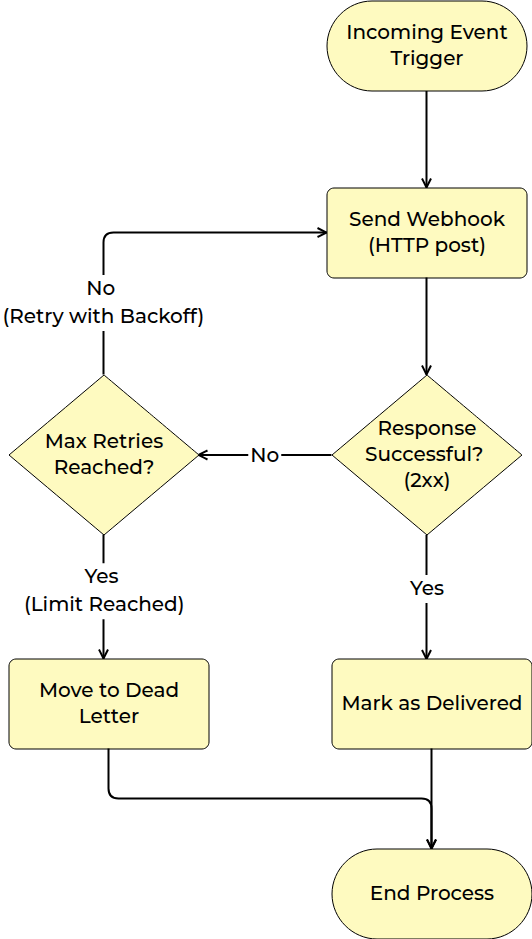
The following sections describe configuration, security, available event types, and payload formats in more detail.
⚙️ Setting up a Webhook in TronDesigner
Open the Webhooks section
In the Admin Panel → Settings → Webhooks, click Create new webhook endpoint.Enter your target URL
Specify the endpoint on your server that should receive webhook notifications.
Example:https://yourdomain.com/api/trondesigner/webhooks.The URL must usehttp://orhttps://, may include a domain or IPv4 address, optional port, and a path.Select event subscriptions
Choose for which events TronDesigner sends an HTTPS POST to your endpoint, such as:logo.created— Triggered when a new logo is created in the system.print_job.created— Triggered when a new print job is created.print_job.updated— Triggered when an existing print job is updated (e.g., status change, metadata change).proofreading.created— Triggered when a new proofreading request or dataset is created.print_data.created— Triggered when new print data is generated or uploaded.
Add custom headers (optional)
Include additional HTTP headers if your endpoint requires authentication or context. Custom headers are sent together with the standard Webhook headers, including the signature header used for payload verification.Security
Each webhook has a secret key used to sign webhook payloads. Use this secret to verify that incoming requests originate from TronDesigner. Secrets are shown only once when created. Endpoints also support secret rotation: after generating a new secret, the previous secret remains valid for a limited grace period, allowing you to update your systems without downtime.The signature is included in a dedicated HTTP header (details of the header name in the Webhook headers, details of secret and validation the signature in the section Secret and Signature Validation).
Delivery options
Configure how deliveries behave using two parameters: timeout and retry attempts. TronDesigner will retry sending a webhook until the maximum number of attempts is reached. If all attempts fail, the delivery is marked as unsuccessful.
Even after the maximum attempt count is reached, you can manually trigger another delivery attempt from the Admin Panel → Settings → Webhooks → Webhook detail→ attempt detail.
⚙️ Setting up your system
To integrate TronDesigner webhooks into your existing system, your server only needs to meet a few requirements:
Expose an HTTP endpoint (using
http://orhttps://) that can receive POST requests with JSON payloads. Examples of JSON payloads.Respond with an HTTP 2xx status code (e.g., 200 or 204) when the webhook is processed successfully.
Any non-2xx response is treated as a failure, and the delivery will be retried.
TronDesigner does not parse error responses from your server — the full response body is simply stored as part of the delivery log
Read the standard Webhook headers.
Optional: process custom headers configured in TronDesigner.
Note: TronDesigner stores both the incoming request and the response returned by your server for each delivery attempt. These details are available in Admin Panel → Settings → Webhooks → Webhook detail → Attempt detail. Request and response bodies are shown in a truncated form.
Webhook Headers
TronDesigner includes several standard HTTP headers with every webhook request. These headers provide metadata for validating the request, handling retries, and processing events.
Secret and Signature Validation
Each webhook is signed using HMAC-SHA256 and includes values that allow the recipient to verify its authenticity and ensure that neither the payload nor the metadata has been modified in transit. The signature also contains a timestamp, which enables the recipient to reject outdated or replayed requests.
The signature covers the timestamp, event ID, and the payload hash. The following string is used for signing:
v1:{timestamp}:{eventId}:{sha256(payload)}We support secret key rotation — the recipient may verify webhook signatures using both the current and the previous secret key.
For specific implementation examples of how to validate the signature on your server, see further.
PHP Example
Example<?php
require_once "WebhookSignatureVerifier.php";
$currentSecret = "your-current-secret";
$prevSecret = "your-previous-secret";
$payload = file_get_contents("php://input");
$headers = getallheaders();
$failure = null;
$verified = WebhookSignatureVerifier::verify(
$payload,
$headers,
$currentSecret,
$prevSecret,
$failure
);
if (!$verified) {
http_response_code(401);
echo json_encode(["error" => $failure]);
exit;
}
// Your custom webhook handling logic goes here
http_response_code(204);
?>Node.js example
Exampleconst express = require("express");
const crypto = require("crypto");
const { WebhookSignatureVerifier } = require("./WebhookSignatureVerifier");
const app = express();
app.use(express.raw({ type: "*/*" }));
const currentSecret = "your-current-secret";
const prevSecret = "your-previous-secret";
app.post("/webhook", (req, res) => {
console.log("[INFO] Webhook received");
const payload = req.body;
let failureReason = null;
const verified = WebhookSignatureVerifier.verify(
payload,
req.headers,
Buffer.from(currentSecret),
Buffer.from(prevSecret),
(r) => (failureReason = r)
);
if (!verified) {
console.error("[ERROR] " + failureReason);
return res.status(401).json({ error: failureReason });
}
// Your custom webhook handling logic goes here
console.log("[INFO] Webhook processed successfully");
return res.status(204).end();
});
app.listen(3000, () => {
console.log("Webhook receiver listening on http://localhost:3000");
});
C# Example
Exampleusing Microsoft.AspNetCore.Hosting.Server;
using Microsoft.AspNetCore.Hosting.Server.Features;
using System.Text;
using WebhookReceiver.Services;
var builder = WebApplication.CreateBuilder(args);
var app = builder.Build();
var server = app.Services.GetRequiredService<IServer>();
var addressesFeature = server.Features.Get<IServerAddressesFeature>();
var currentSecret = "your-current-secret";
var prevSecret = "your-previous-secret";
app.MapPost("/webhook", async (HttpContext ctx) =>
{
Console.WriteLine("[INFO] Webhook received");
using var ms = new MemoryStream();
await ctx.Request.Body.CopyToAsync(ms);
byte[] payloadBytes = ms.ToArray();
string? failureReason = null;
bool verified = WebhookSignatureVerifier.Verify(payloadBytes, ctx.Request.Headers, Encoding.UTF8.GetBytes(currentSecret), Encoding.UTF8.GetBytes(prevSecret), out failureReason);
if (!verified)
{
Console.WriteLine($"[ERROR] Signature verification failed: {failureReason}");
return Results.Json(new { error = failureReason }, statusCode: 401);
}
// Your custom webhook handling logic goes here
Console.WriteLine("[INFO] Webhook processed successfully");
return Results.Ok();
});
app.Run();JSON Payload Examples
Example{
"LogoGuid": "7fa15b7b-e809-461c-b976-1fedba0004a0",
"Filename": "logo.tiff",
"Name": "logo.tiff",
"Type": "RASTER",
"Colors": {
"IsFullColor": true,
"ColorList": []
},
"FilesDescription": {
"OriginalFormat": "TIFF",
"Original": "ORIGINAL_ORIGINAL.tiff",
"ConvertedFormat": "PNG",
"Converted": "CONVERTED_ORIGINAL.png",
"ConvertedWhite": null,
"ConvertedBlack": null,
"PreviewFormat": "PNG",
"Preview": "PREVIEW_ORIGINAL.png",
"PreviewWhite": null,
"PreviewBlack": null
},
"Size": {
"Unit": "PIXELS",
"Width": 2050,
"Height": 2050
},
"Properties": [
{
"ClassPath": "HasTransparency",
"Value": "True"
},
{
"ClassPath": "HasOpacity",
"Value": "True"
},
{
"ClassPath": "RasterInCMYKColors",
"Value": "True"
},
{
"ClassPath": "RasterWithTooManyColors",
"Value": "82"
}
]
}